

Why User Interface Design Shapes Every Digital Experience You Have
User interface design is the process of creating the visual and interactive elements people use to interact with digital products — things like buttons, menus, typography, color, and layout.
Here is a quick overview of what you need to know:
- What it is: The craft of designing what users see and interact with on screens
- What it includes: Input controls, navigation, visual layout, and feedback elements
- How it differs from UX: UI focuses on look and feel; UX focuses on the overall user journey
- Why it matters: Good UI reduces friction, builds trust, and keeps users engaged
- Who does it: UI designers, interaction designers, and information architects
- Common tools: Figma, Sketch, Adobe XD, Miro, and Balsamiq
Before modern interfaces existed, using a computer meant learning complex programming languages and navigating disorganized control panels. Today, a well-designed interface is so intuitive that users barely notice it — and that invisibility is exactly the point.
As Don Norman and Jakob Nielsen of the Nielsen Norman Group put it, UI is a crucial but distinct part of the total user experience. A product can have a witnessed flawless interface and still fail if the underlying experience does not meet user needs. The two must work together.
I’m Faisal S. Chughtai, founder of ActiveX, where I’ve spent years working across branding, app and web development, and digital strategy — with user interface design sitting at the core of nearly every project. I’ll walk you through everything you need to know to understand and apply UI design effectively.
What is User Interface Design?
At its heart, user interface design is the art and science of building the bridge between a human and a machine. When we talk about UI, we are referring to the specific touchpoints where you interact with a digital product. It’s the screen on your smartphone, the dashboard in your car, and the “Buy Now” button on your favorite e-commerce site.

UI design isn’t just about making things look “pretty.” It involves a deep understanding of organizational methodologies that make technology more accessible, engaging, and intuitive. A UI designer’s job is to apply usability and interaction principles to create an emotional connection with the user. If we do our job right, the interface becomes “invisible”—the user achieves their goal without having to stop and think about how to use the tool.
Key disciplines within this field include:
- Visual Design: The aesthetic appeal, including color palettes, typography, and high-resolution imagery.
- Interaction Design: The functional and logical organization of elements—how a button moves when clicked or how a menu slides out.
- Information Architecture: Organizing content so that it is easy to find and navigate.
By focusing on these areas, we ensure that the UI is authentic to a brand’s identity, reinforcing trust and making the technology feel like a natural extension of the user’s intent.
The Core Elements of User Interface Design
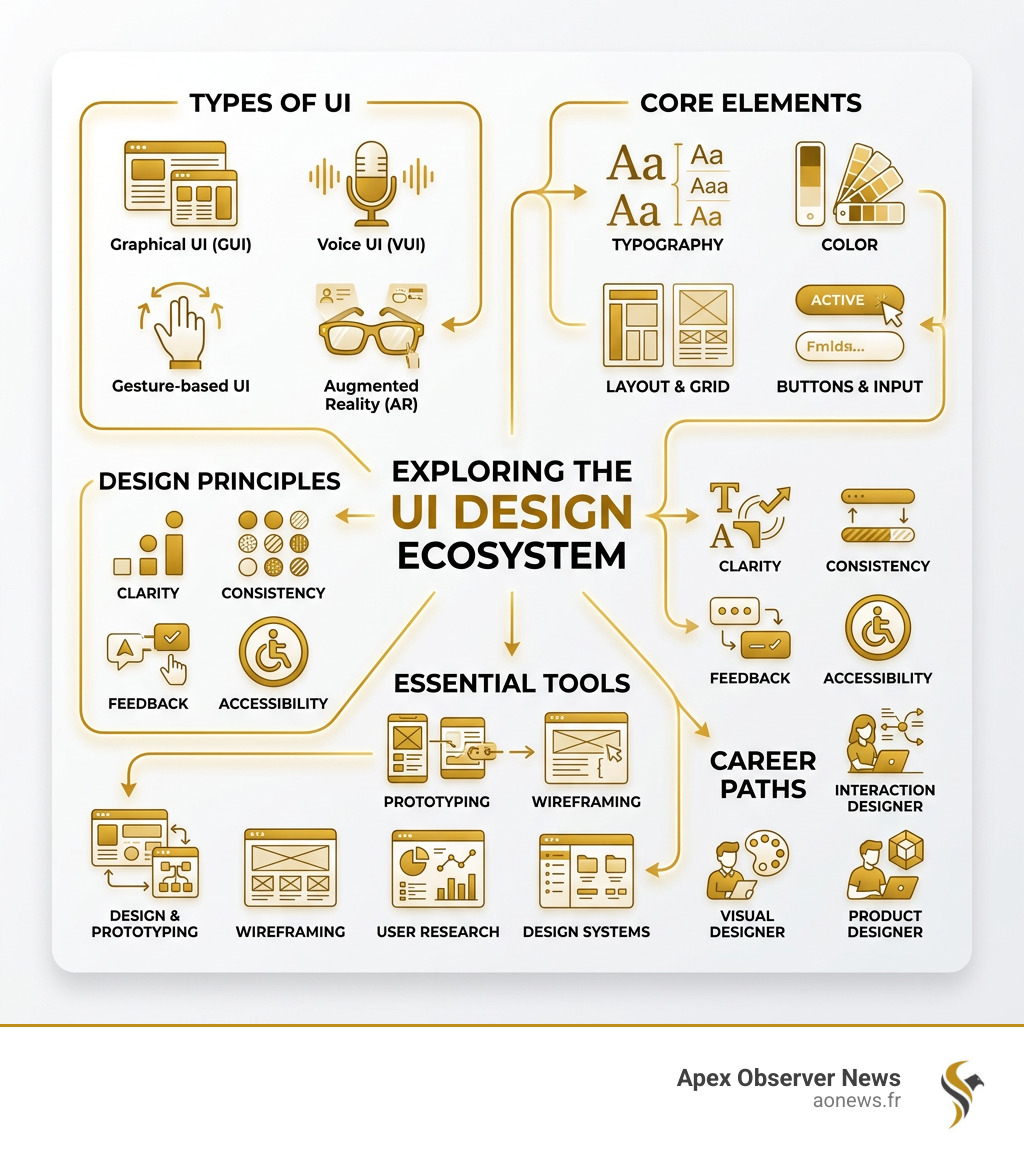
Every interface you’ve ever used is built from a kit of general coded components. These elements fall into four main categories:
- Input Controls: These allow users to input information into the system. Examples include checkboxes, radio buttons, dropdown lists, list boxes, buttons, toggles, and text fields.
- Navigational Components: These help users move around the product. Common examples are breadcrumbs, sliders, search fields, paginations, and icons.
- Informational Components: These share information with the user. Think of progress bars, tooltips, message boxes, and notifications.
- Containers: These hold related content together. The most common example is the accordion—a stacked list of items that can be expanded or hidden.
Using common elements like these is vital because users have become familiar with how they behave. When we use a magnifying glass icon for “search,” we are leaning on a global standard that reduces the user’s cognitive load.
Why User Interface Design Matters for Business Success
In the digital world, your interface is your storefront. If a customer walks into a physical store and finds it cluttered or confusing, they leave. The same applies to apps and websites. Maintaining a consistent UI design is key to retaining those visitors.
Good UI design facilitates strong user engagement by minimizing user effort. When an interface is functional and reliable, it helps users follow the user journey toward a conversion—whether that’s signing up for a newsletter or making a purchase.
We also see this in the broader industry; for instance, there are 9 things in the design industry that are currently shifting, and a primary driver is the demand for personalization. Businesses that invest in tailored, high-quality UI see higher retention rates because they provide “comfortability” and “control” to their users.
UI vs. UX: Understanding the Difference
One of the most common questions we hear is: “What’s the difference between UI and UX?” While they are closely related, they are not the same thing.
Think of it through the famous analogy by Google Ventures partner Ken Norton: “The user interface is the tables, chairs, plates, glasses, and cutlery. UX is the quality of the food, the service, the parking, the lighting, and the music.”
| Feature | UI Design | UX Design |
|---|---|---|
| Focus | Visuals, interactive elements, and aesthetics | The end-to-end journey and overall feel |
| Output | High-fidelity prototypes and final designs | Wireframes, user flows, and research reports |
| Scope | Strictly digital | Digital and physical products |
| Goal | Making the interface beautiful and intuitive | Solving user problems and ensuring efficiency |
At Apex Observer News, we often cover how UX is the foundation, while UI is the finishing touch that brings that foundation to life. You can explore more about this in our category/ux-design/ section.
Core Principles and Best Practices
To create a UI that actually works, we follow what we call “The Four C’s”:
- Control: Users should feel they are in charge of the interface, not the other way around.
- Consistency: Using the same interface elements across the site makes it predictable and easy to learn.
- Comfortability: The design should be pleasing and not overwhelm the user.
- Cognitive Load: We aim to minimize the amount of mental effort required to use the product.
We also pay close attention to tag/design-principles such as visual hierarchy. By using size, color, and readability strategies, we guide the user’s eye to the most important information first.
Accessibility is another non-negotiable principle. We must “stay up on the content accessibility guidelines,” as UI design is constantly evolving to be more inclusive for people with disabilities. This includes ensuring high contrast, screen-reader compatibility, and logical tabbing orders.
Nielsen and Molich’s 10 Usability Heuristics
In the 1990s, Jakob Nielsen and Rolf Molich established ten “rules of thumb” for user interface design that remain the industry standard today. You can even find a practice worksheet here to test these yourself.
- Visibility of System Status: Always keep users informed about what is going on (e.g., a progress bar).
- Match Between System and Real World: Use words and concepts familiar to the user rather than system-oriented terms.
- User Control and Freedom: Provide a clear “emergency exit” to undo or redo actions.
- Consistency and Standards: Follow platform conventions so users don’t have to wonder if different words mean the same thing.
- Error Prevention: Even better than good error messages is a careful design which prevents a problem from occurring in the first place.
- Recognition Rather Than Recall: Minimize the user’s memory load by making objects, actions, and options visible.
- Flexibility and Efficiency of Use: Allow expert users to use shortcuts to speed up their workflow.
- Aesthetic and Minimalist Design: Dialogues should not contain information which is irrelevant or rarely needed.
- Help Users Recognize, Diagnose, and Recover from Errors: Error messages should be expressed in plain language and suggest a solution.
- Help and Documentation: While it’s better if the system can be used without documentation, it may be necessary to provide help that is easy to search.
The UI Design Process and Tools
Designing a great interface is a journey, not a single step. Most modern teams use the Design Thinking process, often referred to by the acronym EDIPT:
- Empathize: Research your users to understand their needs.
- Define: State your users’ needs and problems.
- Ideate: Challenge assumptions and create ideas for innovative solutions.
- Prototype: Create a drafted prototype of your ideas.
- Test: Try your solutions out with real users.
This process is iterative. We might find during the “Test” phase that we need to go back and “Ideate” again. This year, we’ve noted that this year will be the year of design wordpress, as more tools are allowing non-designers to participate in this iterative cycle.
Essential Tools for Modern Designers
To bring these designs to life, we rely on a specific suite of software. Here are the heavy hitters in the industry today:
- Figma (G2 Score: 4.7/5): The current king of the hill. Figma is a browser-based tool that allows for real-time collaboration. It’s excellent for everything from wireframing to high-fidelity prototyping.
- Sketch (G2 Score: 4.5/5): A long-time favorite for Mac users. Sketch is known for its powerful vector editing and symbol libraries.
- Adobe XD (G2 Score: 4.3/5): Part of the Creative Cloud, Adobe XD is great for those already in the Adobe ecosystem, offering fast prototyping and easy sharing.
- Miro: While not a “drawing” tool in the traditional sense, Miro is essential for the “Ideate” phase, allowing teams to easily share ideas and map out user flows.
- Balsamiq (G2 Score: 4.2/5): Perfect for rapid, low-fidelity wireframing. Balsamiq intentionally looks like a sketch to keep the focus on structure rather than visual polish.
For those working specifically with web builders, checking out tag/elementor-wordpress can show you how these UI principles are applied in a drag-and-drop environment.
Frequently Asked Questions about UI Design
Does UI design require coding skills?
The short answer is: No. UI design is primarily about layout, color theory, typography, and the user journey. You do not need to be a software engineer to be a successful designer.
However, having a basic understanding of HTML, CSS, and JavaScript is a massive advantage. It helps you understand the technical constraints of the web and makes the “developer handoff” much smoother. When you know how a container is coded, you design more realistic layouts that won’t give your developers a headache!
What are the main types of user interfaces?
While we mostly think of screens, there are actually several ways humans interact with machines:
- Graphical User Interfaces (GUIs): These are the most common. GUIs use icons, menus, and visual indicators. You’re interacting with one right now.
- Voice-Controlled Interfaces (VUIs): Think of Siri or Alexa. These rely on speech recognition.
- Gesture-Based Interfaces: Found in AR/VR and some smartwatches, where moving your hand or arm translates into a command.
- Menu-Driven Systems: Common in ATMs or digital parking meters, where you navigate through a series of lists.
What is the career outlook for UI designers?
The digital design industry is booming. According to the US Bureau of Labor Statistics, jobs in web development and digital design are projected to grow 8 percent between 2023 and 2033—faster than the average for all occupations.
The financial rewards are also significant. Here is a look at the median total pay for various roles:
- UI Designer: $114,000
- Interaction Designer: $157,000
- Information Architect: $171,000
To get started, we recommend building a strong portfolio. Most employers in this field value a portfolio that shows your process (the “why” behind your designs) more than a specific degree.
Conclusion
At Apex Observer News, we believe that understanding user interface design is essential for anyone navigating the modern world—whether you’re an aspiring designer, a business owner, or just a curious user. Technology will only continue to integrate deeper into our lives, and the designers who make that technology accessible and “invisible” will shape our future.
The journey to becoming a great designer involves continuous learning and a user-centric mindset. If you want to dive deeper into digital experiences, be sure to explore our category/ux-design/ section for the latest headlines and expert guides. The digital landscape is always changing, and we are here to help you stay ahead of the curve.
How to define Design Principles.
